Showing posts with label Nintendo Wii. Show all posts

Thwimp v1.2.0.1 update!

Thwimp v1.2.0.1 Update!

 
    Almost a year since the v1.2 release, Thwimp, the modification utility which allows one to view, to rip, and to encode Nintendo THP video files from/for Mario Kart Wii, has been updated to v1.2.0.1 today!
 
    This is a minor update to the original v1.2 build with internal code changes and bugfixes. It contains some bugfixes for some application-breaking issues related to parsing and displaying of Single datatypes on foreign machines within the application.  
 
Bug fixes:
  • Fixed various cultural issues that would cause the application to break when processing THP videos and to display wrongly formatted data on foreign machines
  • Enforced invariant culture for the bugfixes to parse and to display Single datatype values properly
  • Added more input validation within the THP Viewer/Ripper sections
  • Fixed a coding typo of handling the video end frame value as a Single datatype instead of as a UShort in the THP Viewer/Ripper section 

Enhancements:

  • Added a notification MsgBox on successful save of the application's log file 
  • Updated default "Elevator Music" (song.wav) include with application to final version of Mario Kart Wii Menu SMPS32x song from my own WIP Knuckles Clackers game mod
  • Updated copyright date to ©2021
    • GNU FOSS license of source code
    • Manual
    • Application build data

New Elevator Music song
 

   Download and full changelog available on the releases page

Enjoy!

-Tamkis

Thwimp v1.2 Update!

Thwimp v1.2 Update!

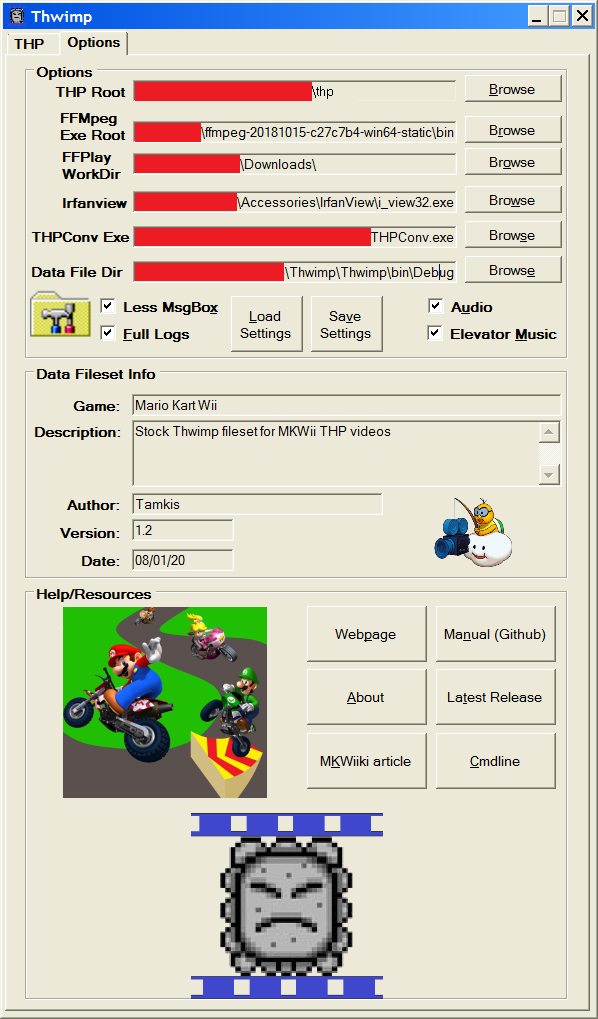
 Thwimp, the modification utility which allows one to view, to rip, and to encode Nintendo THP video files from/for Mario Kart Wii, has been updated to v1.2 today! This new update fixes, enhances, and adds the following (summary):

Bug fixes:

  • Fixed serious, application-breaking bug where pointing to a real i_view32.exe IrfanView executable would cause the THP Encoder process to fail.
  • Optimized THP encoding, especially when handling videos requiring dummy/control padding.
  • Fixed error parsing String datatype into Single datatype when in a foreign culture.
  • Fixed KeepInRange() function parsing bugs.
  • Fixed lingering file I/O from StreamReaders/Writers.  

Enhancements: 

  • Added an additional dummy entry as 0th entry in default Mario Kart Wii data fileset
  • Enhanced and improved GUI.
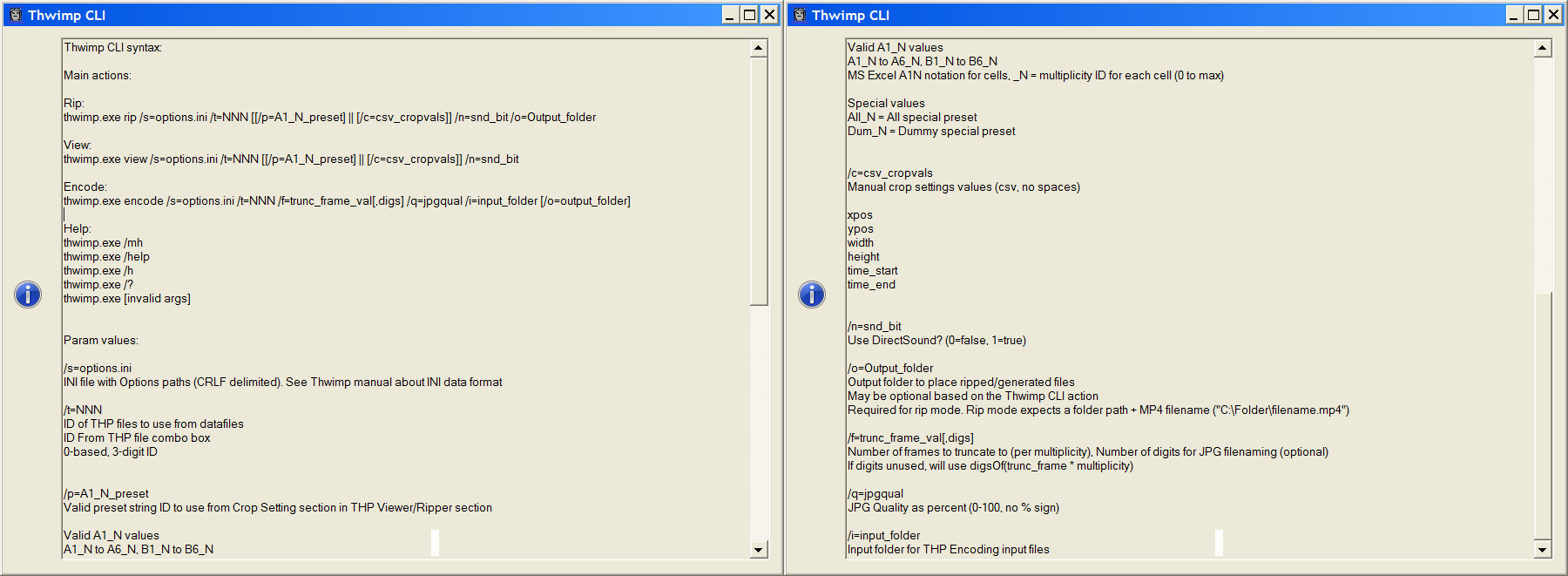
  • Added new Thwimp CLI feature!
  • Enhanced THP Viewer/Ripper
  • Added new options
    • Full Log
      • Logs everything (include call to FOSS co-utilities) to the Logger 
    • Less MsgBox
      • Suppress informational MsgBoxes when using the THP Encoder
    • Audio
      • Enable audio
    • Elevator Music 
      • Enable elevator music (plays a song when using the THP Encoder)
  • Added FileSet.txt to Thwimp data fileset (displays metadata about currently loaded fileset)
  • Added ability to load/save settings to/from an INI file
  • Added audio to application
  • Added progress bars/application logger

Furthermore, the user's manual (on the Github page) has been updated with updated images and information

 
  You can view the recent GUI changes and new CLI feature in the following videos:


   Download and full changelog available on the release page

Enjoy!

-Tamkis


Thwimp v1.1 Update!

Thwimp v1.1 Update!


 Thwimp, the modification utility which allows one to view, to rip, and to encode Nintendo THP video files from/for Mario Kart Wii, has been updated to v1.1 today!

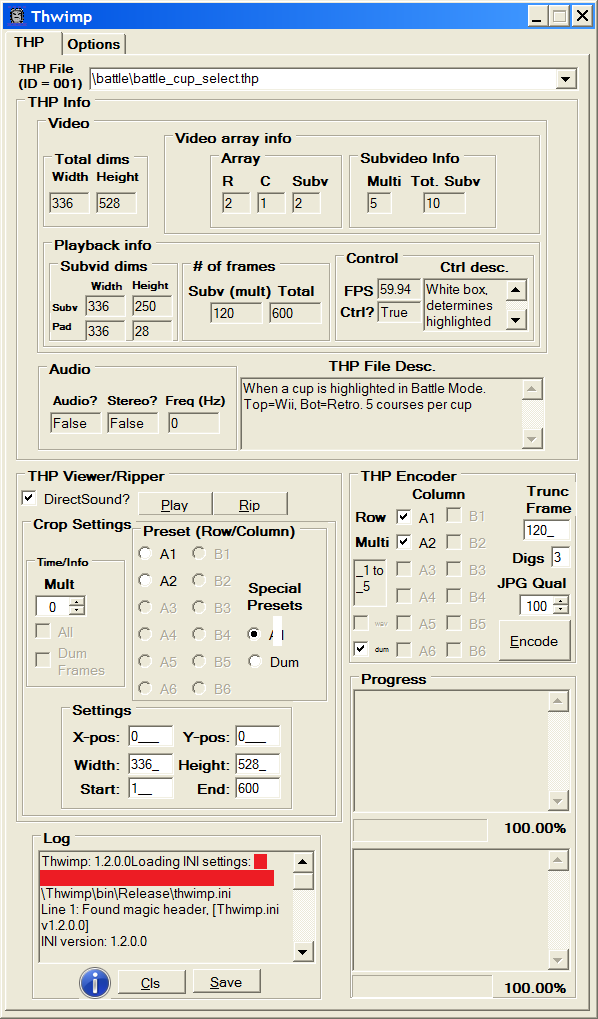
   This new update fixes a few bugs from the initial release (proper framerate not being applied to newly encoded THP video files, and improper ripping of the control BMP frames from battle_cup_select.thp), as well as refactors the THP Viewer/Ripping section! When cropping THP videos for ripping, users can now click radio buttons to select a subvideo cell to crop to. The section now includes a start/end frame field, for selecting a time period at which to clip the video to. A numeric up/down control has been added to select from which multiplicity time period for ripping subvideo frames from. Furthermore, the user's manual (on the Github page) has been updated with images, better spelling/grammar, and updates. Most importantly, an article for the application has been added to the Mario Kart Wiiki!


 You can view the changes with the THP Viewer/Ripper in this update video.


  I had been holding off on writing a MKWiiki article for the application until this v1.1 update was released. This application was quite challenging to write, due to the idiosyncrocies involved with the command line params for FFMPEG. I'm quite pleased with how this application turned out. Hopefully MKWii modders will find it quite useful for creating new THP videos for their menu-based THP files!

  You can download the application either from the Wiiki article, the Thwimp webpage, or get the source code from the Github page.

Enjoy!

-Tamkis

Hover Pack Release!

Hover Pack Release!


   After about 3 or so months of work during leisure time, Hover Pack has been released for Mario Kart Wii! During the past month, all tracks have been finished, and polished with some bugfixes and some visual enhancements have been added. Furthermore, the pack has been enhanced with custom graphics (making the game more Windows 95/Hover themed), new THP videos, many custom songs, and even a custom Hover Item Pack! This pack replaces all of the items used in the game with some new ones.


   The pack, item pack, and individual courses can be download from the project page (which link to MKWiiki articles where the downloads reside). A future update will be made to address some issues in the new content later.

--Tamkis

Thwimp utility released / Hover Pack project announcement

Thwimp utility released / Hover Pack project announcement


   Lately, I have been looking into modding Mario Kart Wii on the Nintendo Wii, with My Stuff files in Riivolution. Specifically, I have been working on designing a pack of custom battle courses, ported from the mazes in Microsoft Hover! (1995), called "Hover Pack", with an additional track being a port of Arena Rumble from Monster Truck Madness 2. Currently, maze 1, maze 2, and maze 3, and the Easter Egg Credits Maze have been ported, and are all done other than adjusting enemy route widths. The pack (when released), will include a new title screen, sound effects from Hover, music from Hover, some custom music, new THP videos for the tracks (created with Thwimp), the new battle courses themselves, and "Flag Grabbers" mode (modified Coin Runners mode with Microsoft Hover flags to capture). You can view the current progress at this YouTube playlist.

    While creating Hover Pack, I created new THP video files. These video files are used in the menus, title video, and ending sequence. Unfortunately, most of these THP files are actually an array of subvideos inside (with a multplicity of subvideo per frame), are all of equal frame length, and are quite complex to create manually. Some actually include padding (THP videos' dimensions must align to the nearest 16px boundary), and sometimes this padding including what I call a "control signal". This signal is usually a white rectangle in the padding, which moves to an integer position at each multiplicity, in order to tell the game which row to highlight in a menu during THP playback.

   With all of these problems with manually creating THP video files, I have create and released Thwimp utility!

    Thwimp is a Windows utility which allows users easily to view, to rip, and to encode Nintendo THP video files for Mario Kart Wii. Written in Visual Basic (from Visual Studio 2010 IDE), the Thwimp application calls some FOSS and other command line tools (not included) "from arms length" via the Command Prompt to perform its tasks. For encoding new THP files, Thwimp can intelligently handle audio, subvideo array, multiplicity, and padding/control information when encoding THP files to replace ones in-game. It does this by accepting appropriately named, input mp4 video files for each subvideo cell in the array, and for each multiplicity. It will also accept a WAV audio file, and BMP image frames for each multiplicity padding/control signal as needed. After reading the input files, Thwimp will intelligently process and splice all of the files together appropriately in order to create a high-quality, properly formatted THP video replacement file!

    Today, I have updated the EagleSoft Ltd webpage with a new Nintendo Wii section, a Thwimp page (where you can learn more about the utility and download it), and Mario Kart Wii Tracks page (to host all of my incoming new tracks) .

  I hope people find Thwimp useful for THP editing!

-Tamkis
Copyright EagleSoft Ltd. Powered by Blogger.